










You can easily change the password if you have access to your WordPress account.
1. Log in to the WordPress dashboard.
2. From the Dashboard menu, go to Users and click on Profile.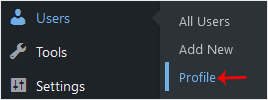
3. Scroll down to Account Management and click on Set New Password.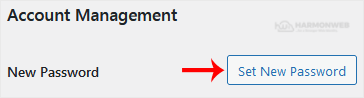
4. Copy the password to a safe place and click on Update Profile to change your password.
- Hem - Kundavdelning
-
Butik
- Visa alla
- Shared Hosting
- WordPress Hosting
- SSL Certificates
- CodeGuard
- Email Spam Filtering
- Marketgoo
- OpenXchange
- Cloud Server
- Corporate Hosting
- Developer Cloud
- SSL Certifikat
- Säkerhetskopiering av webbplats
- Webbplatssäkerhet
- E-posttjänster
- SEO-verktyg
- Professionell e-post
- VPN
- Registrera en ny domän
- Flytta en domän till oss
- WP Verktygslåda
- Nyheter & Meddelanden
- Hjälpcentral
- Partner
- Kontakta Oss
-
Mer