

Thunderbird is a friendly email client software for managing your email. You can set up a cPanel email account with Mozilla Thunderbird and receive/send the email.
1. Open Mozilla Thunderbird.

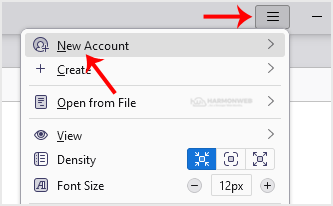
2. Click on the menu icon located on the right side of the screen and choose New Account. The drop-down menu will populate with new options.
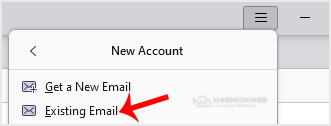
3. Click on Existing Email.
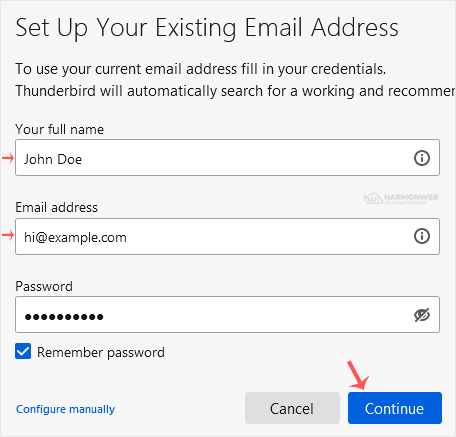
4. In the Mail Setup Account, fill out your name, full email address, and your email account password. Proceed with Continue.
5. It may take a few minutes to configure your email account. After that, click on Done.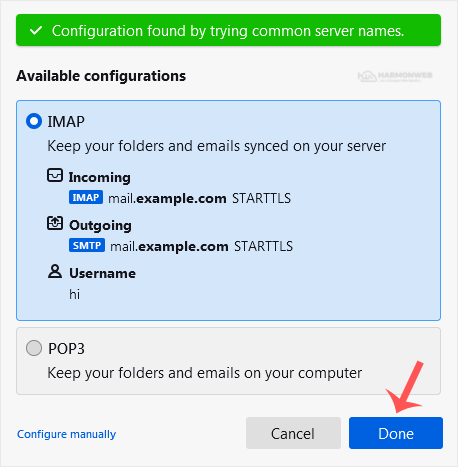
6. If it shows an SSL Security Exception, click on Confirm Security Exception and the warning will disappear.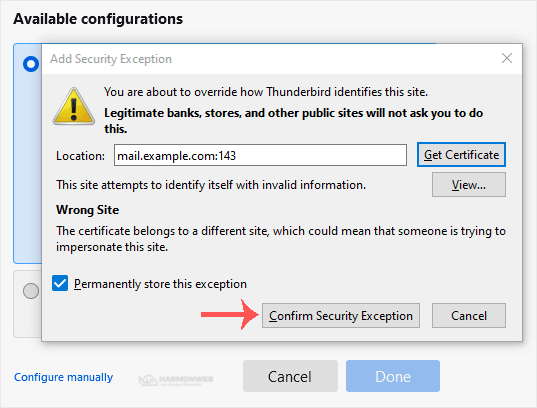
Congratulations, your email is set up successfully. You can now manage your email through Mozilla Thunderbird.
Categories
Affiliates and Referrals
5
Backup/Restore
4
Checkout & Billing
16
CloudLinux (cPanel)
10
cPanel - Control Panel
24
Databases
11
DirectAdmin
48
DNS - Nameservers
6
Domain Management
10
Domains
26
Email
17
FTP
9
Hosting
1
How To Place An Order
1
Installing a Control Panel
6
Mail Filters & SPAM
8
Mobile
11
My Account
0
Others
3
PayPal
7
Plesk
47
Resellers
4
Security
10
SiteWorx/InterWorx
58
Softaculous
69
SolusVM
18
SSL
5
SSL Certificates
0
Virtualizor
19
WHM
18
WordPress
17
Categories
Tag Cloud
account
affiliates
backup
balance
Bandwidth
billing
cancellation
cPanel
Cron Job
Database
DNS
Domain
domain registration
domain reseller
Email
File Manager
Hostname
ID Protection
invoice
Jetbackup
NG Domain
payment
PHP
place order
Pricing
python
reseller account
reseller hosting
rres
security
SEO
shared hosting
sitebuilder
ssl
support
upgrade
upgrage
VPS
web hosting
Website Optimization
WHM
WHOIS
WordPress
How to Setup a cPanel Email Account in Mozilla Thunderbird Print
- 0
Was this answer helpful?
Related Articles
How to Check for New Email in Mozilla Thunderbird
Thunderbird is an email client software. You can work with it in the following way.
1. Open...
How to Delete Email Messages in Mozilla Thunderbird
You can easily remove email in Mozilla Thunderbird.
If you use the POP email protocol, the...
How to Forward an Email in Mozilla Thunderbird
You can forward an email to other email accounts using Mozilla Thunderbird. 1. Open Mozilla...
How to Send an Email Using Mozilla Thunderbird
You can send an email using Thunderbird. It is quite straightforward as you do not need to log in...
How to Reply to Email in Mozilla Thunderbird
You can reply to an email using Mozilla Thunderbird instead of the cPanel Webmail. 1. Open...
Tag Cloud
account
affiliates
backup
balance
Bandwidth
billing
cancellation
cPanel
Cron Job
Database
DNS
Domain
domain registration
domain reseller
Email
File Manager
Hostname
ID Protection
invoice
Jetbackup
NG Domain
payment
PHP
place order
Pricing
python
reseller account
reseller hosting
rres
security
SEO
shared hosting
sitebuilder
ssl
support
upgrade
upgrage
VPS
web hosting
Website Optimization
WHM
WHOIS
WordPress
 NGN
 USD
 GHS
 KES
 MWK
 RWF
 TZS
 UGX
 XAF
 XOF
 ZMW
